Load Balanced Virtual Server Instances (Erl, Naserpour)
How can a workload be balanced across virtual servers and their physical hosts?
Problem
If a runtime workload is improperly distributed across both virtual servers and their physical hosts, then some virtual servers become over-utilized, while others are under-utilized or running idle.Solution
The workload is recalculated at runtime and virtual servers are correspondingly moved between hosting physical servers to ensure even distribution across virtual and physical layers.Application
A capacity watchdog surveys physical and virtual servers and reports variance to the VIM, which interacts with a load balancer and live VM migration to dynamically adjust virtual server locations.Mechanisms
Automated Scaling Listener, Cloud Usage Monitor, Hypervisor, Load Balancer, Logical Network Perimeter, Resource Cluster, Resource Replication, Virtual ServerCompound Patterns
Burst In, Burst Out to Private Cloud, Burst Out to Public Cloud, Cloud Balancing, Elastic Environment, Infrastructure-as-a-Service (IaaS), Multitenant Environment, Platform-as-a-Service (PaaS), Private Cloud, Public Cloud, Resilient Environment, Software-as-a-Service (SaaS)Problem
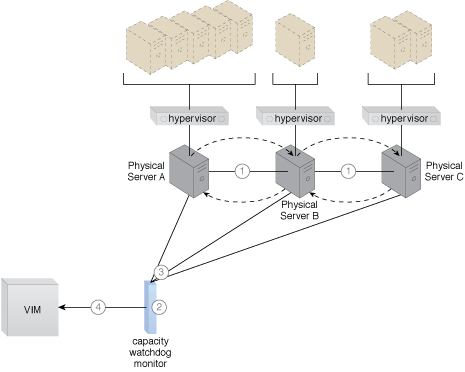
When physical servers operate and are managed in isolation from one another, it is very challenging to keep cross-server workloads evenly balanced. One physical server can easily end up hosting more virtual servers or having to process greater workloads than neighboring physical servers.
Figure 1 - Three physical servers are encumbered with different quantities of virtual server instances, leading to both over-utilized and under-utilized IT resources.
Over time, the extent of over- and under-utilization of the physical servers can increase dramatically, leading to on-going performance challenges (for over-utilized servers) and constant waste (for the lost processing potential of under-utilized servers).
Solution
A capacity watchdog system is established to dynamically calculate virtual server instances and associated workloads and to correspondingly distribute the processing across available physical server hosts.
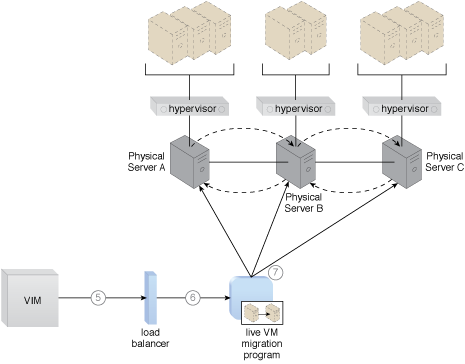
Figure 2 - The virtual server instances are evenly distributed across the physical server hosts.
Application
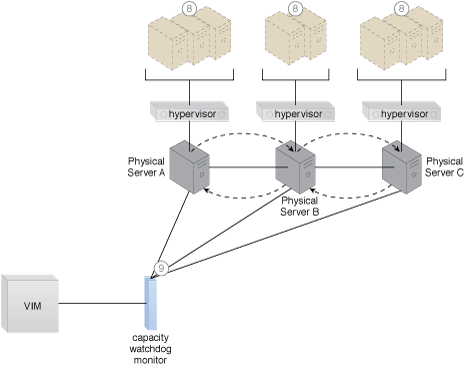
The capacity watchdog system is comprised of a capacity watchdog cloud usage monitor, the live VM migration program, and a capacity planner. The capacity watchdog monitor keeps track of physical and virtual server usage and reports any significant fluctuations to the capacity planner, which is responsible for dynamically calculating physical server computing capacities against virtual server capacity requirements. The capacity planner can decide to move a virtual server to another host to distribute the workload at which point it signals the live VM migration program to perform the move of the targeted virtual server from one physical host to another.
Figure 3
- The Hypervisor Cluster pattern is applied to create a cluster of physical servers.
- Policies and thresholds are defined for the capacity watchdog monitor.
- The capacity watchdog monitors physical server capacities and virtual server processing.
- The capacity watchdog monitor reports an over-utilization to the VIM.
- The VIM signals the load balancer to redistribute the workload based on predefined thresholds.
- The load balancer initiates live VM migration to move the virtual servers.
- Live VM migration transitions the chosen virtual servers from one physical host to another.
- The workload is balanced across the physical servers in the cluster.
- The capacity watchdog continues to monitor the workload and resource consumption.
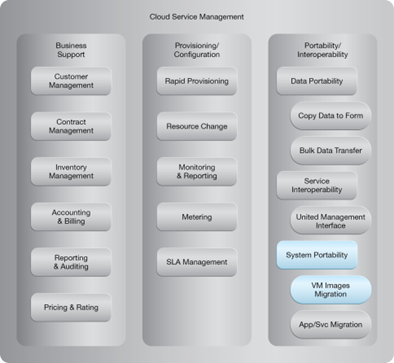
NIST Reference Architecture Mapping
This pattern relates to the highlighted parts of the NIST reference architecture, as follows:
This pattern is covered in CCP Module 5: Advanced Cloud Architecture..
For more information regarding the Cloud Certified Professional (CCP) curriculum, visit www.cloudschool.com.
Arcitura IT Certified Professionals (AITCP)
Arcitura YouTube Channel